Recording media retention
Last updated: September 17, 2026
Sometimes you may not want Airspeed to keep the recording of a call. In those cases you can choose to keep the transcript only. Airspeed still produces the transcript, summary and insights, but never stores the video or audio.
Recording retention can be set at three levels: for your whole organization, for your own calls, and for an individual call.
Keeping the transcript only means Airspeed never downloads or stores the recording. Once a call has been processed this way, its video and audio were never stored, so that call cannot be reprocessed and the recording cannot be recovered. This cannot be undone.
Organization level
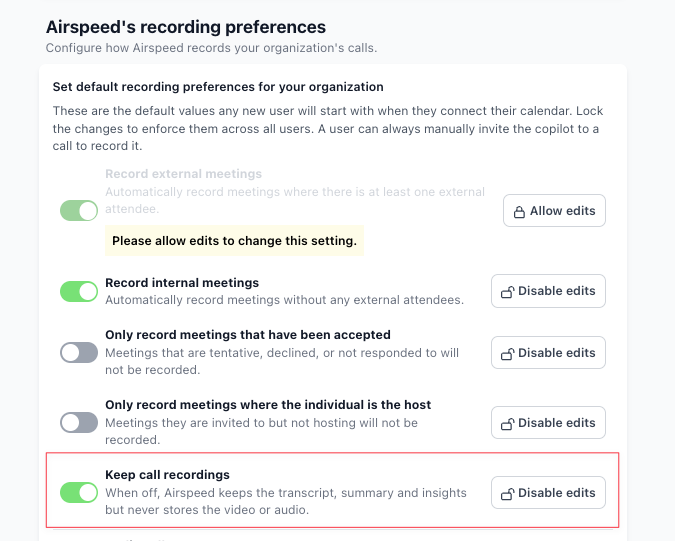
Admins can set the default for everyone in the organization under Settings → Organizational
Use the "Keep call recordings" toggle to set the default. Select "Disable edits" to enforce it, which stops members changing recording retention for their own calls or for individual calls.
User level
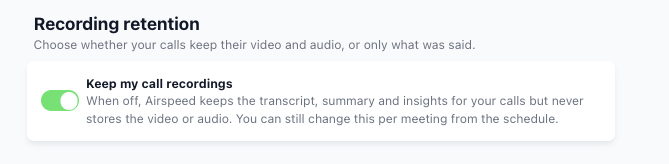
If your administrator has not locked the setting, you can set the default for your own calls under Settings → Personal
Call level
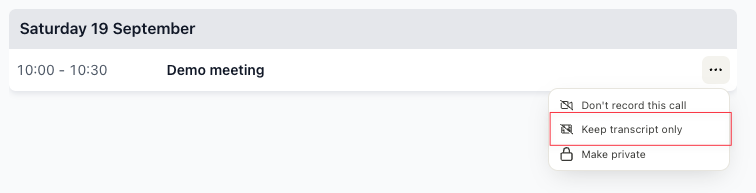
To keep the transcript only for one upcoming call, open its actions menu on the Schedule page and select "Keep transcript only".