How Airspeed syncs with HubSpot
Last updated: September 8, 2026
Airspeed reads your HubSpot data so it can match each call to the right Deal, Company and Contacts — and, when you switch it on, write the results back.
A few things worth knowing up front:
Airspeed reads HubSpot live — it doesn't copy your CRM. Instead of duplicating your portal, Airspeed looks up exactly what it needs, when it needs it.
You're always in control of write-backs. Reading is automatic; writing anything back into HubSpot (a logged meeting, notes, AI insights, tasks) is entirely opt-in.
How Airspeed finds the right deal
The same journey runs the moment a call is processed, and again on a daily catch-up.
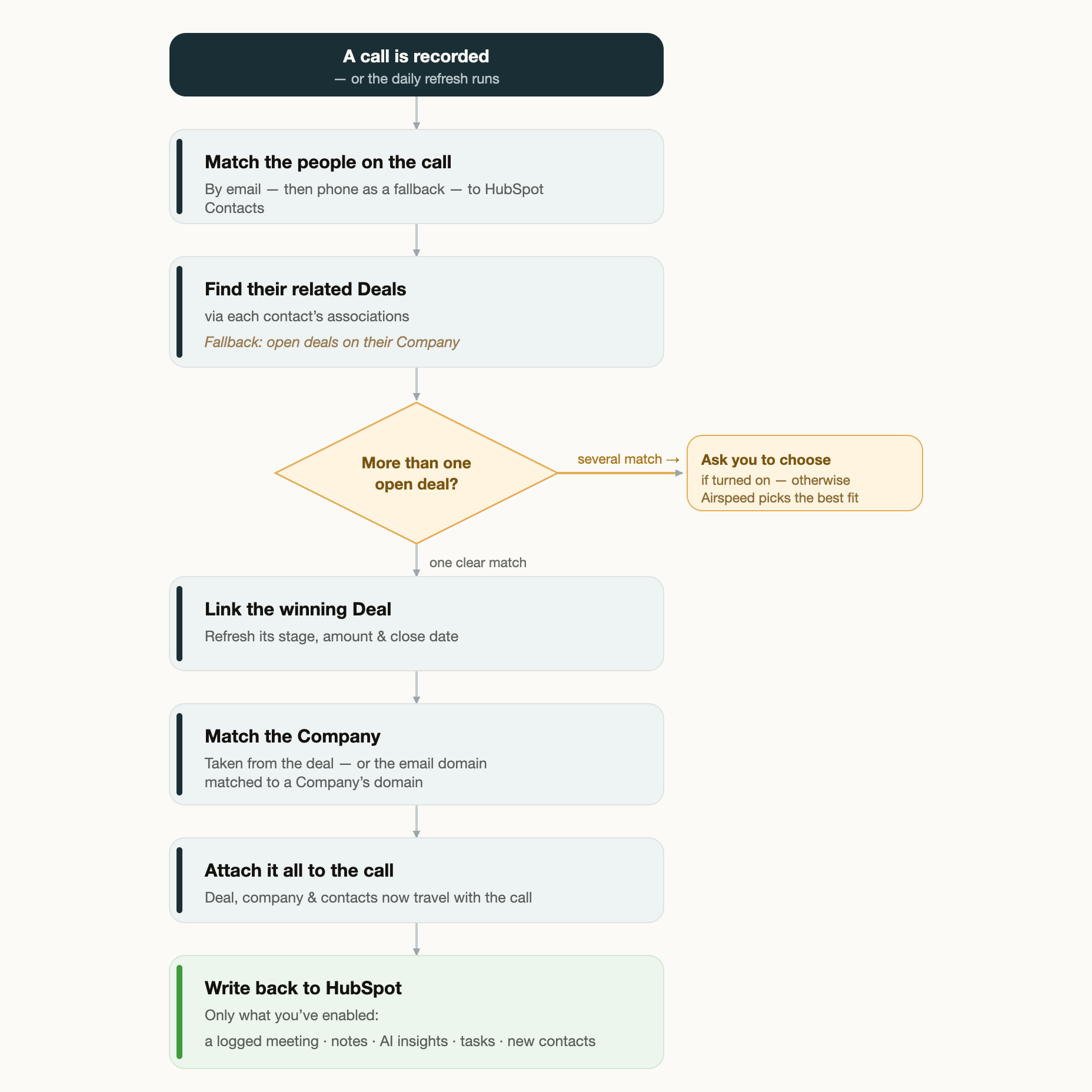
The flowchart shows these steps end to end:
A call is recorded - we take all the data from the call and start to process it
Match the people on the call — we use emails & phone numbers to match HubSpot Contacts.
Find their related Deals — via each contact's associations. Fallback: open deals on their Company.
More than one open deal? — if several match, Airspeed asks you to choose (when turned on), otherwise it picks the best fit. If you have selected auto-match, we'll select the most recent deal.
Link the winning Deal — and refresh its stage, amount & close date.
Match the Company — we'll match to the correct company based on the deal, or if no relevant deal, we'll use the email domain to match to a Company's domain.
Attach it all to the call — deal, company & contacts now travel with the call.
Write back to HubSpot — we'll only ever sync what you've enabled: a logged meeting, notes, AI insights, tasks and/or new contacts.
When syncing happens
We sync call data to your CRM in two different ways:
Right after each call. As soon as a call finishes processing, Airspeed matches it to the right deal, company and contacts.
On a daily catch-up. Once a day, Airspeed re-checks recent calls from the last week that didn't match a deal the first time and tries to match them. This can be useful when you create a deal in HubSpot shortly after the call.
Deal details also refresh regularly. Stage, amount and close date on open deals are kept up to date throughout the day.
Deal-level insight fields update on the same two triggers. AI-generated values Airspeed writes back to a deal (for example a "Next steps" field) are recomputed and re-synced after each new call matched to the deal, and again whenever a new deal comment is added. Between those, the regular background sync re-checks the deal and re-syncs.
Emails and calendar events are picked up on the background sync, not instantly. Airspeed reads emails live from HubSpot at sync time rather than storing them, so a newly logged email is reflected on the next regular background sync — which runs multiple times a day — rather than the moment it arrives.
How a new value combines with what's already in HubSpot depends on the per-field sync behavior you choose: overwrite replaces the existing value, append adds to it, and merge combines the two.
Sync timing is managed by Airspeed and runs automatically; it isn't something you need to schedule.
How the match is decided
Airspeed always starts from the people on the call. It looks up each external participant in HubSpot by email (and by phone number for dial-ins), then follows their associations to the deals they're connected to.
Airspeed will ignore any deal that is:
Closed before the call start date
Open but has a historically dated close date
When several open deals fit. On busy accounts, more than one deal can look like a match — especially when Airspeed falls back to "all open deals on the company." You can turn on Ask me to choose so Airspeed pauses and lets a person pick the right deal instead of guessing. By default it breaks any tie by choosing the most recently created one.
How the company and contacts are matched
Company. If the call is already linked to a deal, its company comes straight from that deal. Otherwise, Airspeed matches the participants' email domain (e.g. acme.com) to a Company's domain — including any additional domains you've set on the record.
Contacts. Participants are matched by email first, then by phone number. If a participant isn't in HubSpot yet and you've enabled it, Airspeed can create a new Contact for them. Note: if there are more than 15 external participants on a call, this step does not run.
What Airspeed can write back
Each of these is a separate setting, and every one is off until an admin enables it.
Logged meeting / call
Call notes & summaries
AI-generated insights → fields
Tasks & next steps
New contacts
Deal amount, close date & stage
When Airspeed logs a meeting, it attaches it to the matched contacts, company and deal, and it updates that day's existing entry rather than creating duplicates. Write-backs only ever touch the fields you've mapped, and every write is recorded for a clear audit trail.
What you can control
Setting | What it does | Default |
|---|---|---|
Enabled pipelines | Limit deal matching to specific HubSpot pipelines | All |
Ask me to choose | Pause and let a person pick when several deals match | Off |
Log meeting / call | Record the call as a HubSpot engagement | Off (type: Meeting) |
Sync notes & insights | Write call notes and AI insights to mapped fields | Off |
Sync tasks | Push next steps as CRM tasks (optionally limited to teams) | Off |
Create contacts | Create missing participants as Contacts | Off |
Pull logged calls | Bring calls logged in HubSpot into Airspeed (with a minimum length) | Off |
Field mapping | Choose which HubSpot field backs each value (e.g. deal amount) | — |
Not sure which to enable? Your Airspeed contact can walk you through the right setup for your team.
Good to know
People need to be in HubSpot to help matching. If a call participant has no matching contact, they don't contribute to finding the deal.
Associations do the heavy lifting. The stronger your contact-to-deal associations in HubSpot, the more precise Airspeed's matching — the company fallback is a safety net, not the ideal path.
Turn on "Ask me to choose" for busy accounts. It's the best guardrail against a call landing on the wrong open deal.