Amplemarket Integration
Last updated: October 26, 2026
Airspeed can import calls made from the Amplemarket dialer. Once connected, we check Amplemarket for new calls every few minutes, download each recording, and process it like any other conversation, with summaries, insights, scorecards, and tasks. Calls use Amplemarket's own speaker-labeled transcript, so your rep and the prospect are always told apart.
What you'll need
An Amplemarket API key. An Amplemarket admin can create one in Amplemarket — see Amplemarket's API quickstart guide.
Make sure your reps are Airspeed users
We import a call only when the Amplemarket rep who made it is an Airspeed user with call recording turned on, matched by email address. Each rep's Amplemarket email must match the email they use to sign in to Airspeed. Calls made by anyone else are skipped.
Connecting Amplemarket
In Airspeed, go to Settings → Organizational → Call recorder and click Connect next to Amplemarket.
Paste your API key and click Connect. We check the key with Amplemarket before saving it. If Amplemarket doesn't accept it, you'll see an error and nothing is saved.
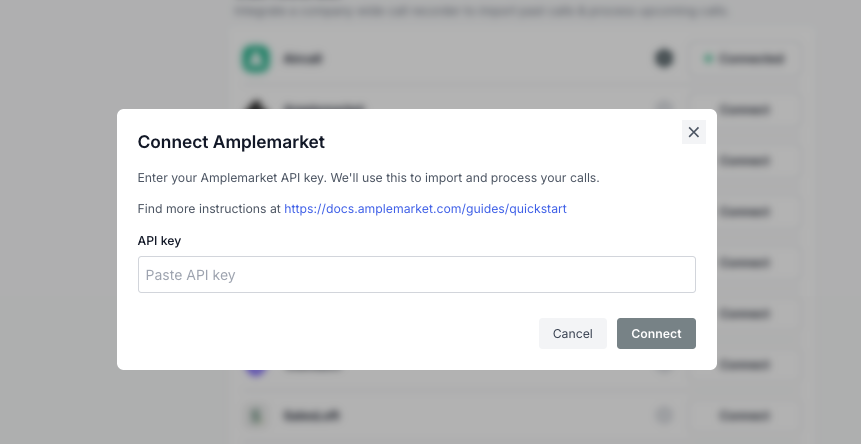
Once connected, new calls usually appear in Airspeed within a few minutes of the call ending.
Which calls are imported
Calls of 30 seconds or longer. You can change this under Minimum call duration on the Amplemarket card.
Calls where your rep speaks. Voicemails and phone menus where only the other side is heard are skipped.
Calls made from Amplemarket's dialer. Calls logged in Amplemarket from another dialer are skipped. Connect that dialer to Airspeed directly instead.
Note: Amplemarket limits how many recordings can be downloaded each hour. If your team makes a lot of calls, or you've just connected, some calls may take an hour or two to appear while we work through them. No calls are lost.
Disconnecting
To disconnect, open Settings → Organizational → Call recorder and click Disconnect next to Amplemarket. Airspeed stops importing new Amplemarket calls. Calls already in Airspeed stay.
Permissions
Only admins can connect or disconnect Amplemarket.
FAQ
How do I replace the API key?
Disconnect Amplemarket, then connect again with the new key. Calls already imported stay, and they won't be imported twice.
Why is a call missing?
Check that the call is longer than your minimum call duration, that your rep speaks on it, and that the rep is an Airspeed user with recording turned on and the same email in both tools. If the API key was deleted in Amplemarket, connect again with a new one.
Will Amplemarket calls be matched to my CRM?
Yes, the same way as your other calls. Airspeed uses the call's participants to match it to Contacts, Companies, and Deals.
Still need help? Reach out to support@goairspeed.com with the date, time, and rep of any call you expected to see.